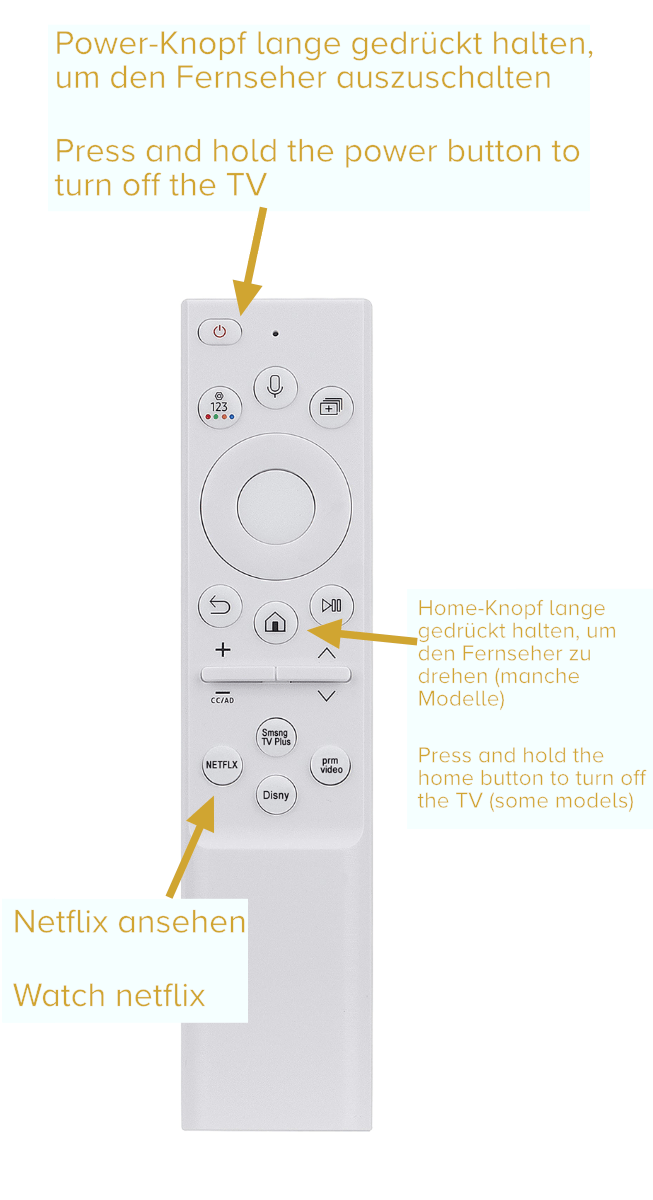
→ Image of the television remote control with important buttons
🔌 Turning the TV off completely
Samsung Frame TVs normally display either:
GoldenKey-Suites information about your stay
or the “Frame” Art Mode image (picture frame)
If you want the room completely dark at night:
👉 Press and hold the power button (On/Off) on the remote control for a few seconds.
The TV will then fully switch off.
Short press = Art Mode
Long press = fully powered off
Rotating Smart TV – Special Feature in the Suite “Augsburger Rathausplatz”
The living room TV in the “Augsburger Rathausplatz” suite can rotate between portrait and landscape mode.
To rotate the TV:
👉 Press and hold the Home button on the remote control.
The TV will automatically rotate to portrait or landscape.
Portrait mode gives you more space and a better view toward the Rathausplatz and the pedestrian area.
Netflix and Other Streaming Services
Netflix and other popular streaming apps are pre-installed on all TVs.
Example: Netflix
Press the Netflix button on the remote control.
Sign in with your Netflix profile (scan the QR code with your smartphone).
Please remember to remove your profile before check-out (Profile → Edit → Delete)
Tip: You can stream content directly from your smartphone to the TV. This allows you to avoid signing in with your personal account on the TV itself.
TVs in Bedroom & Living Room
Every suite includes a Smart TV in the living room, and some suites also feature a TV in the bedroom.
Both are modern Samsung Smart TVs
Please do not change system settings (picture settings, network, etc.)
Everything is set up for immediate and easy use.
Important bottons of the remote control